Admin panel
A second application, on its own port, for the person who runs the installation rather than the people who use it. Written for someone deciding whether it covers what they need to operate Ragen — where something is not built, or is deliberately absent, this page says so.
The panel administers the whole installation, so there is no public copy of it to try — it runs on your own deployment, reachable by the accounts you make platform administrators. The app it administers is at demo.ragen.ai.
Who it is for, and what it is not
Ragen has two administrative surfaces, split by scope rather than by subject:
| Where | Who reaches it | Answers | |
|---|---|---|---|
| Organization settings | the main app, under Organization | that organization's own owners and admins | "how much does my organization use", "here is my API key" |
| Admin panel | a separate app on port 3200 | anyone with User.role = 'admin' | "how much does this installation use", "revoke somebody else's key" |
So the panel is not a superset of the app. Issuing an API key for your own integration is routine work for whoever owns the integration; revoking one that belongs to somebody else is incident response by an operator. Both exist, and neither is the other's duplicate.
If you run one installation for several client organizations — an agency, an implementation partner — the panel is where you see all of them at once, and each client still sees only itself. The boundary is enforced by different guards, not by different URLs.
Getting in
The panel authenticates against the same users table as the main app, so
there is no second set of accounts. A session alone is not enough: the
dashboard layout re-reads User.role from the database on every request,
which means revoking the role or banning the account takes effect immediately
rather than when a session expires.
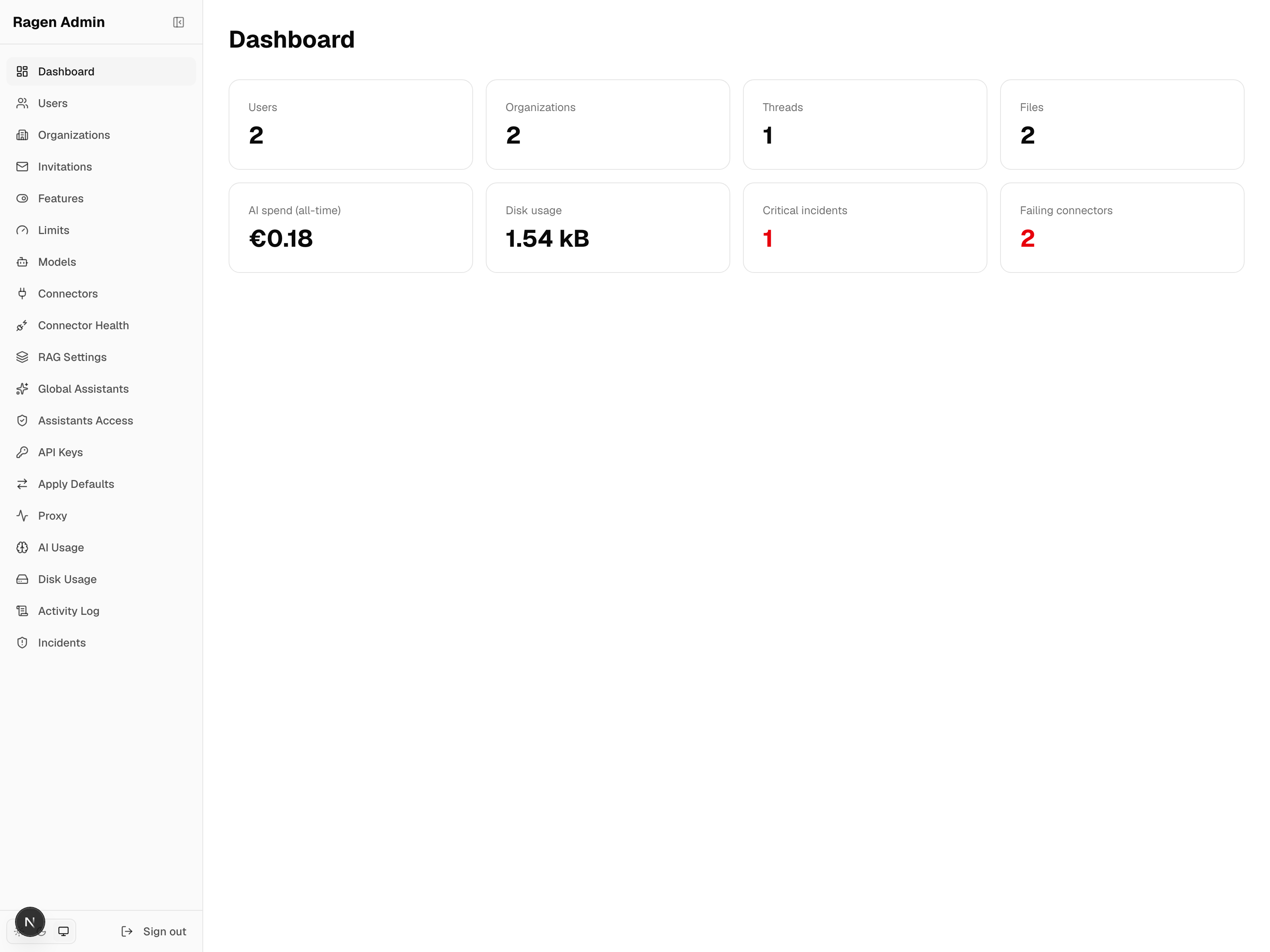
- Create the first account as described in Self-hosting → The first account. That account is the platform administrator.
- Open
http://localhost:3200and sign in with the same e-mail and password. - Grant the role to anyone else from Users in the panel.
Google sign-in is optional. When it is configured,
ADMIN_ALLOWED_EMAIL_DOMAIN restricts which e-mail domain may create a new
account through it; set it empty to allow any, since access is decided by the
role anyway.
Organizations
Every organization on the installation, and a detail page per organization holding its members, settings, subscription, usage and recent audit entries.
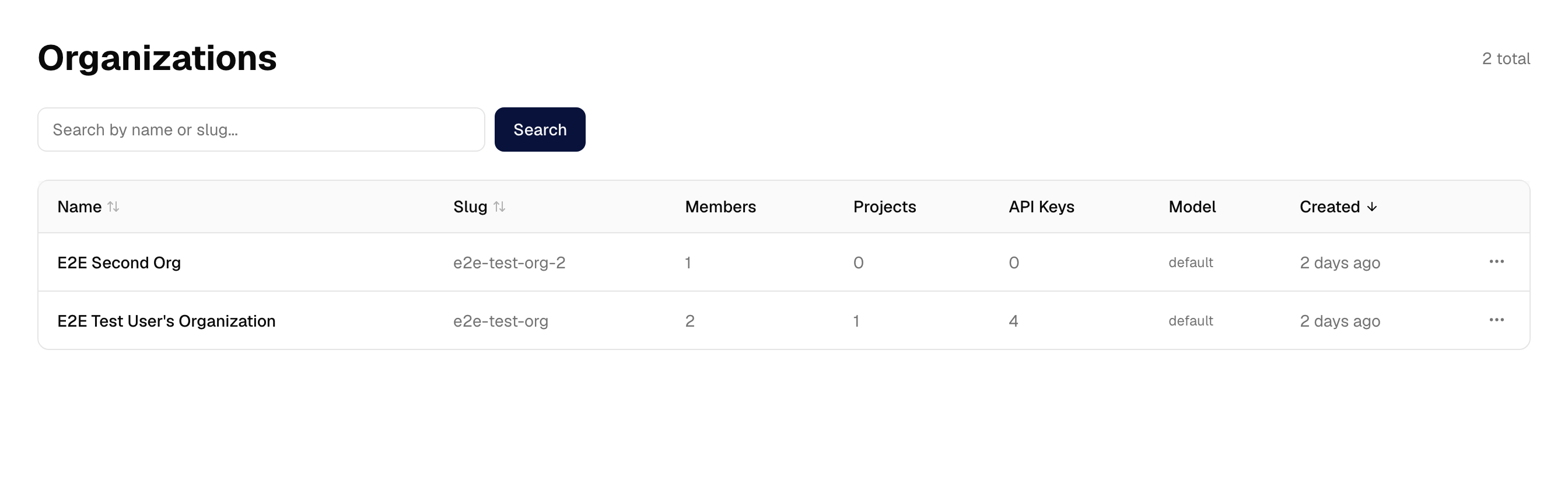
Membership is managed here: add somebody who already has an account, change their organization role, remove them. Two refusals are deliberate and cannot be clicked past:
- the last owner of an organization cannot be removed or demoted;
- the account must already exist — the panel does not create accounts.
Adding a member also joins them to every LiteLLM team the organization has, so their model usage is attributed to the right budget rather than falling outside it.
Users and the platform role
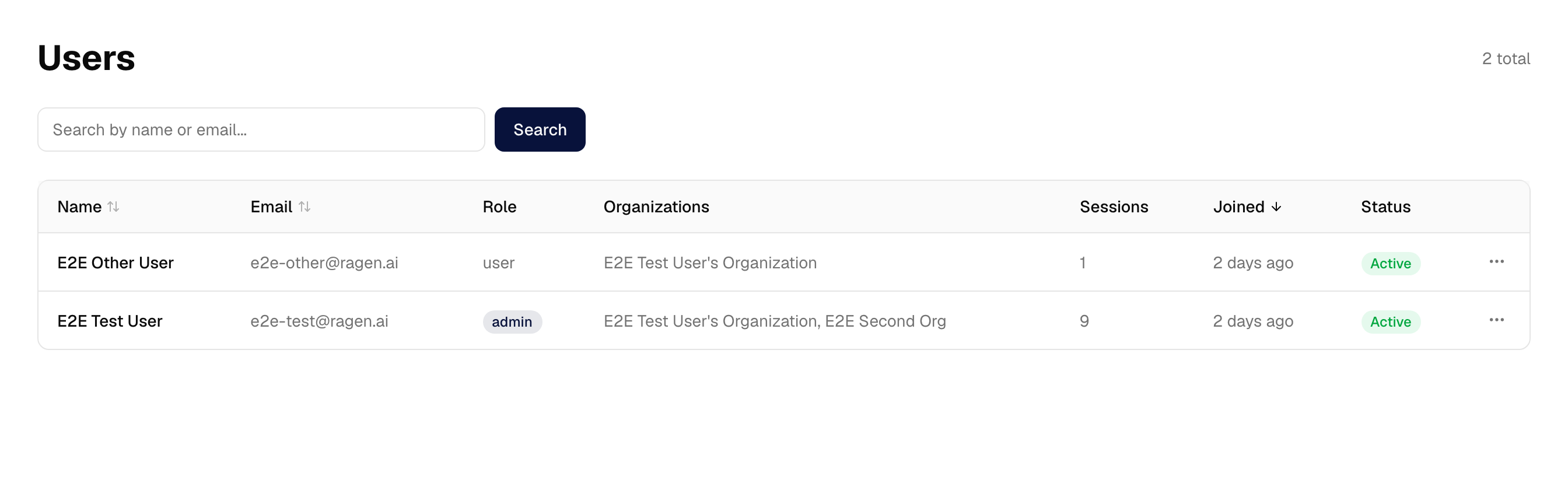
Rename, ban and unban an account, and grant or revoke the platform role. Banning also revokes that account's sessions, so it takes effect on the next request rather than whenever the session would have expired.
Two guards protect access to the panel itself: you cannot revoke your own role, and you cannot revoke the last remaining administrator's. The second is enforced with a locking read inside a transaction — two administrators demoting each other at the same moment would otherwise both succeed and lock everybody out.
Features
A feature flag is answered by the first of four layers that sets it:
organization override → plan → platform default → built-in default
The platform default is the layer an operator wants. Without it the only thing above the built-in constant was the subscription plan, so an installation that manages no plans could only answer "is API access on here" by setting an override on each organization one at a time.
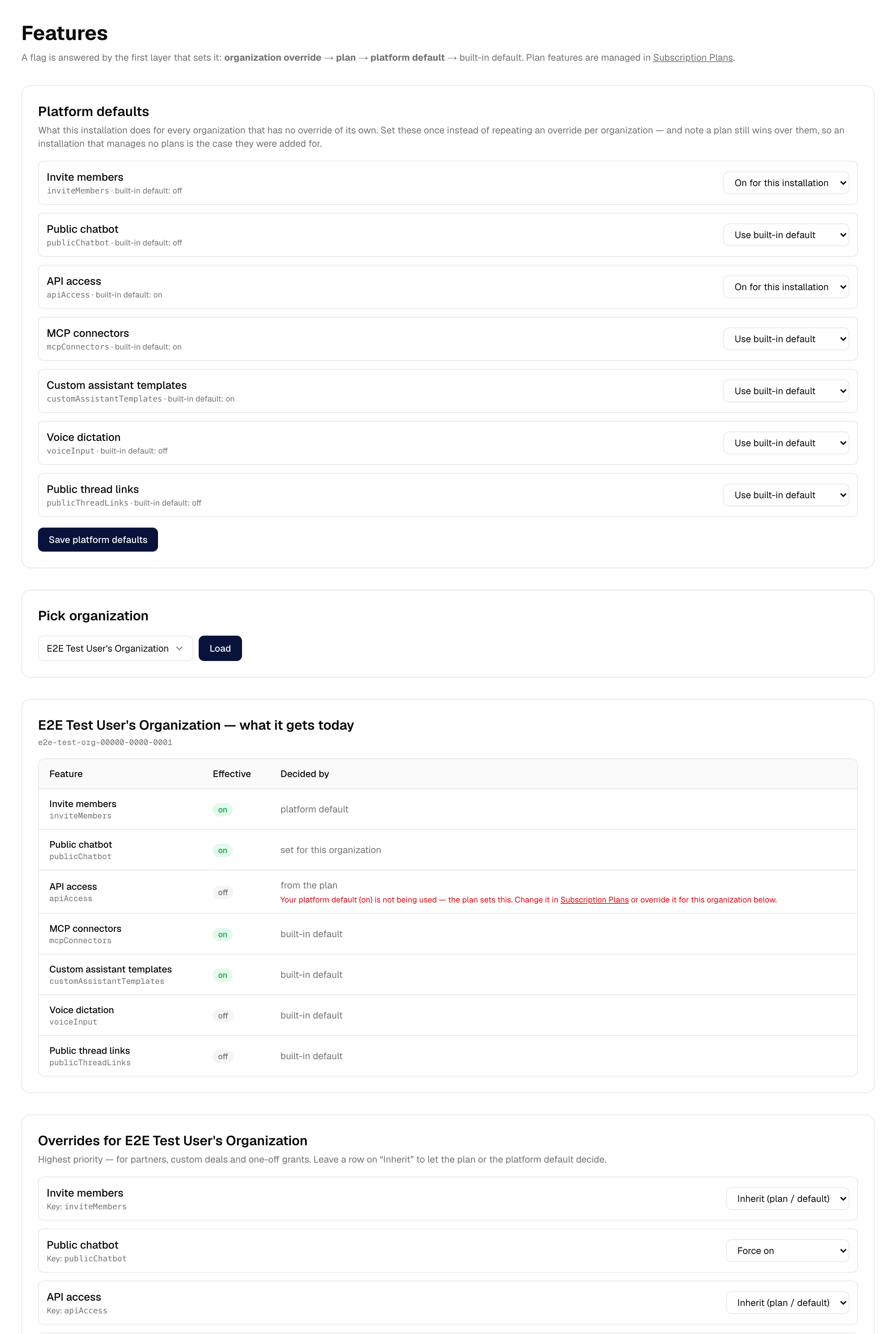
The page also reports what each feature evaluates to for a chosen organization, and which layer decided it. That matters more than it sounds: an override that is doing real work and one being shadowed by a plan look identical from a form that only shows the override. When a plan is overruling a platform default the row says so, and points at where to change it.
Limits, models, RAG settings, and applying them
Storage ceilings, monthly token and cost caps, member caps, which models an organization may use, and the RAG pipeline switches — each editable per organization and as a platform default.
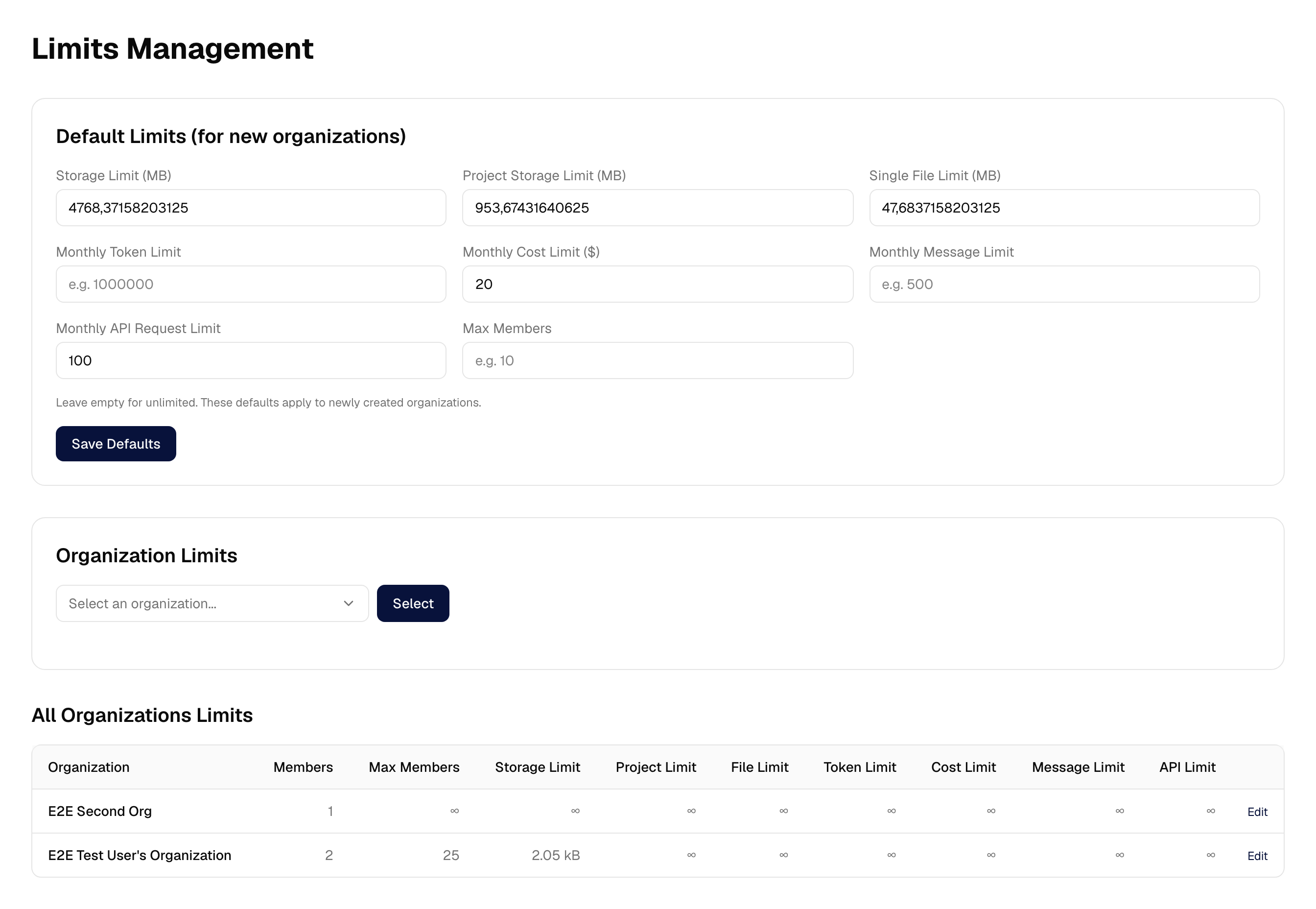
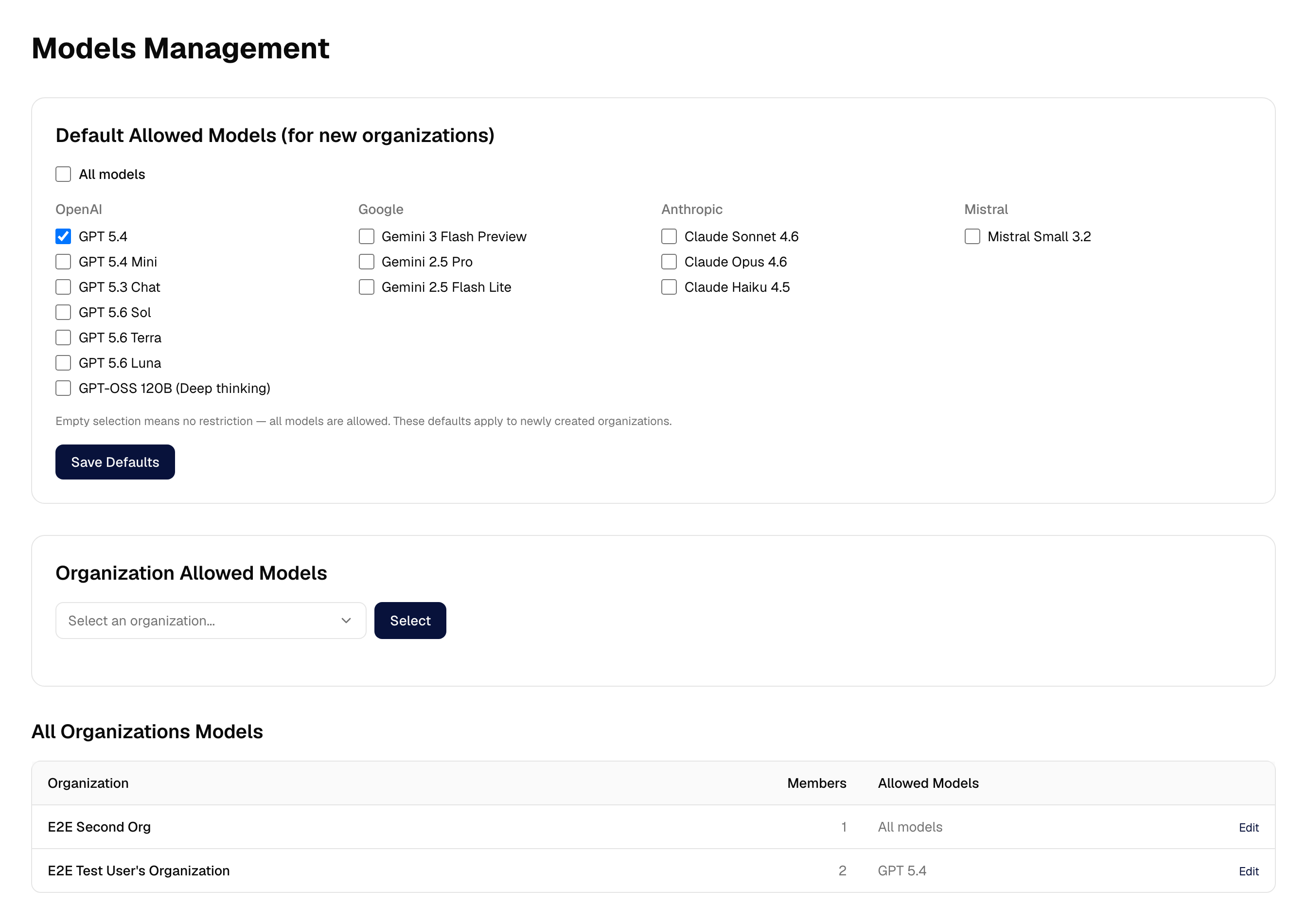
A default is copied into an organization when the organization is created, and never again. So a default edited afterwards reached only the organizations created since. Apply Defaults fixes that, and shows exactly what would move before it moves anything:
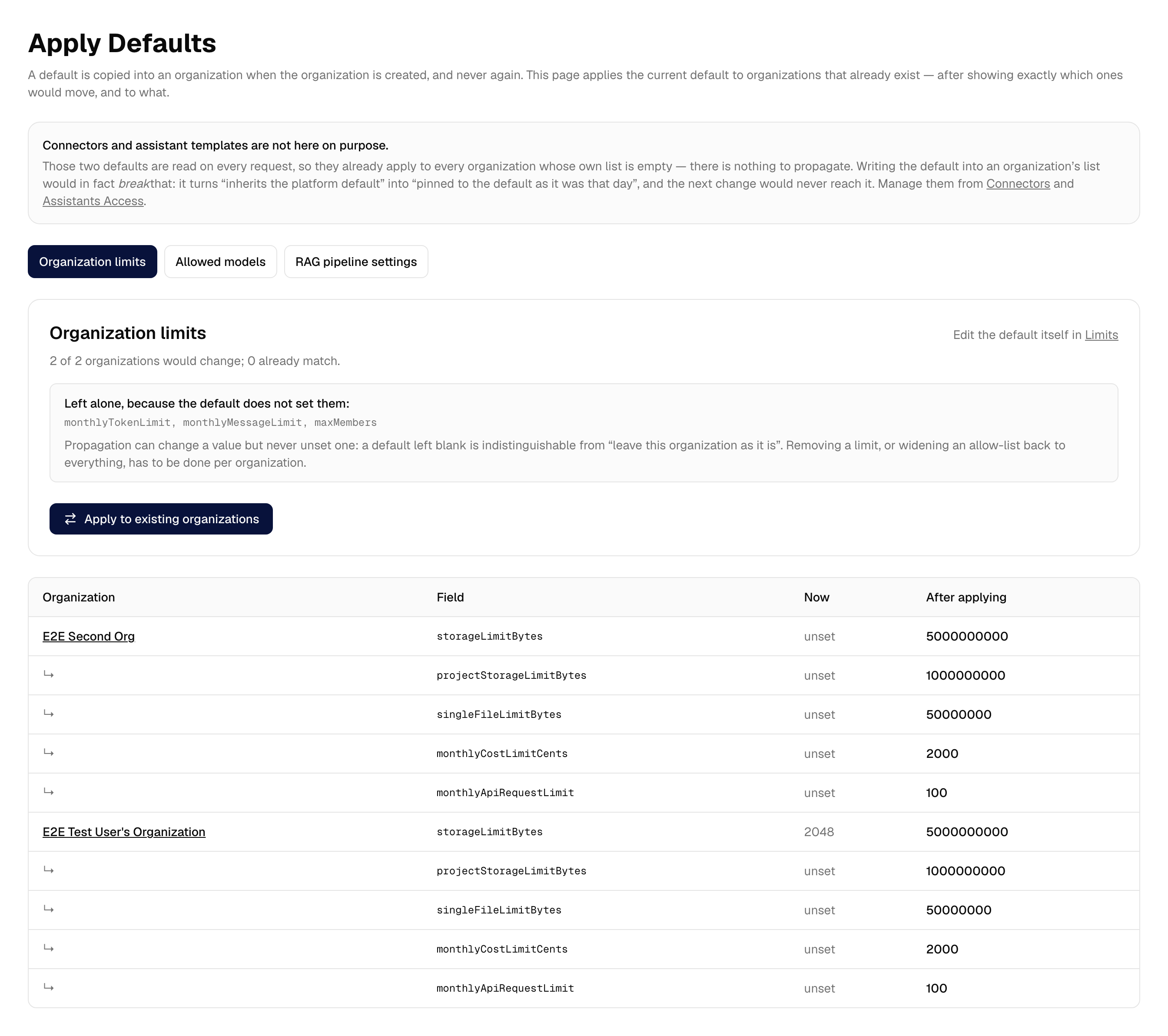
Two things this page is careful about, because both were invisible before it existed:
- It cannot clear a value. A default left blank cannot be told apart from "leave this organization alone", so propagation raises and lowers values but never removes them. The fields it will skip are listed, by name.
- Connectors and assistant templates are absent on purpose. Those two defaults are read on every request, so they already apply to every organization whose own list is empty. Writing one into an organization's list would break that — it turns "inherits the default" into "pinned to the default as it was that day".
API keys
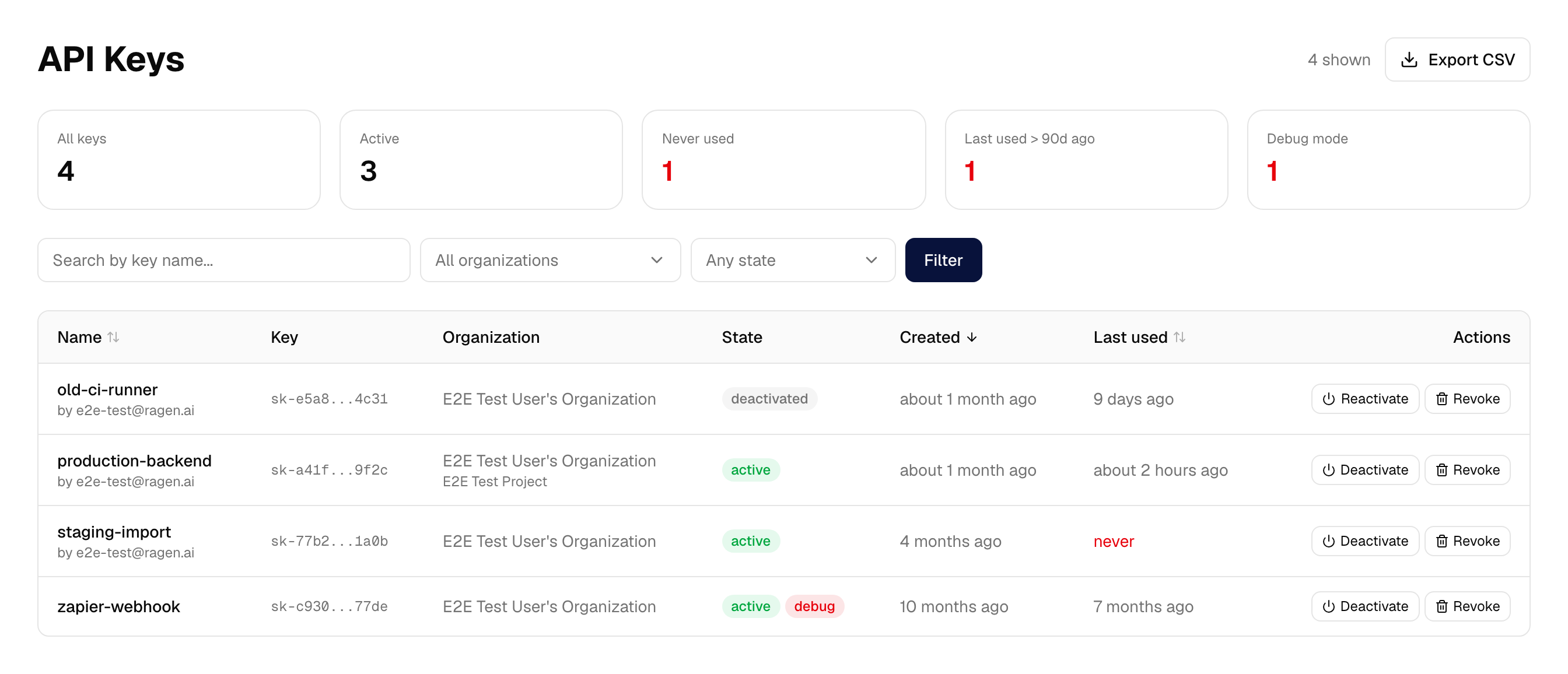
Every key on the installation, with the organization and project it belongs to, who created it, whether debug mode is on, and when it was last used. That last column is the reason to open the page: a key nobody has ever called is the one worth withdrawing.
Two separate controls, because they are not the same decision:
| What it does | Reversible | |
|---|---|---|
| Deactivate | clears isActive; the key stops authenticating immediately | yes — the secret is kept |
| Revoke | deactivates, then deletes the secret from the token vault, then deletes the row | no |
The secret itself lives in ragen-token-vault, not in Postgres, so revoking
needs RAGEN_TOKEN_VAULT_URL and RAGEN_TOKEN_VAULT_SERVICE_SECRET
configured on the panel. Without them the page still lists keys and still
deactivates them — and says why Revoke is unavailable. If the vault cannot be
reached mid-revoke, the key is left deactivated with its row intact and the
panel tells you the secret survived, rather than deleting the only record of
it.
Connector health
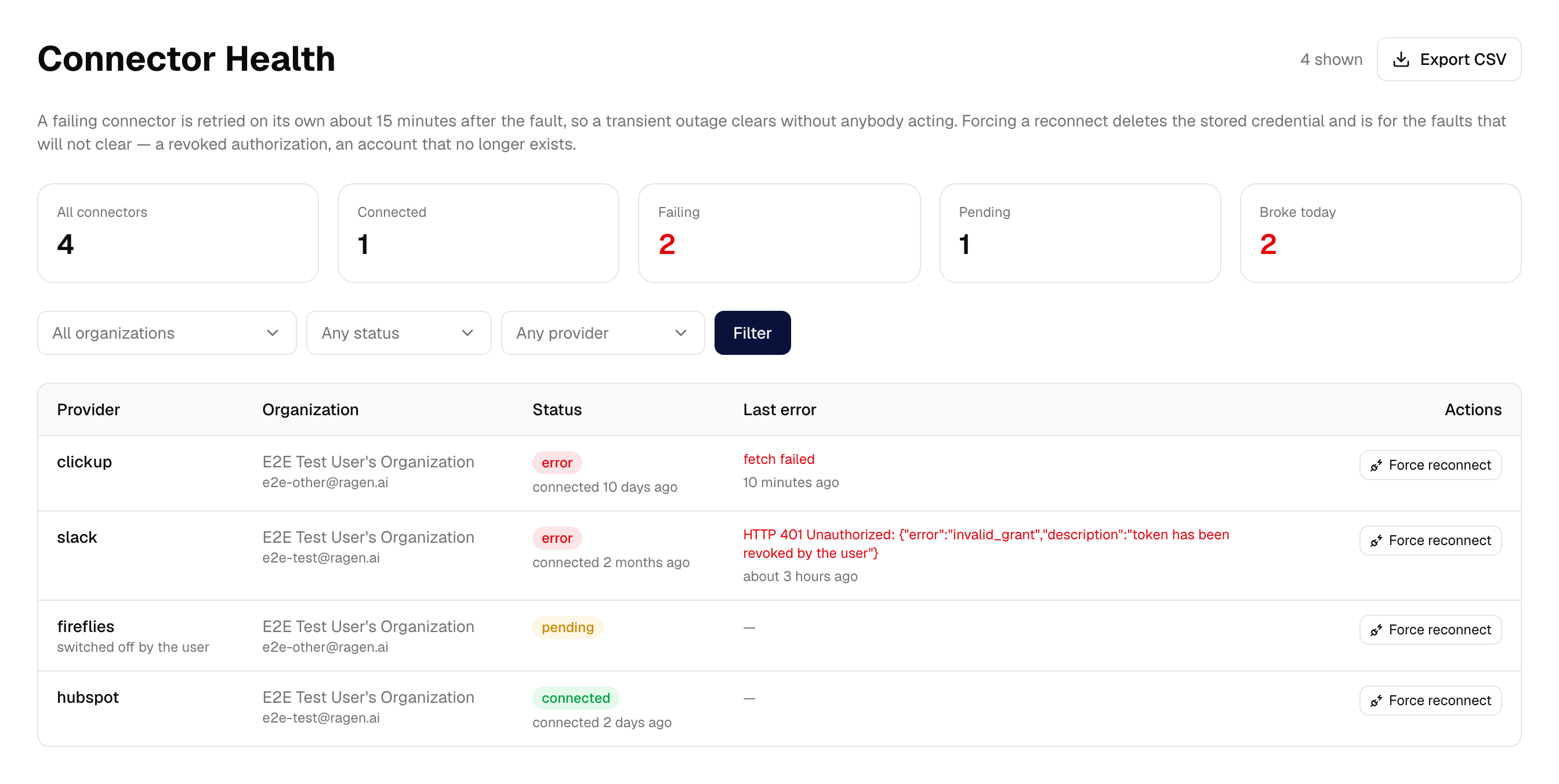
Which MCP connectors are failing, why, and how long ago.
Before this existed a connector whose token had expired or whose server was
down stayed marked CONNECTED: the customer's settings page showed it as
healthy and their assistant simply stopped having those tools. Nothing
anywhere recorded the reason. Now the failure is written down — and the
customer sees it too, on their own connectors page, with the reason and a
prompt to reconnect.
A failing connector is retried automatically about fifteen minutes after the fault, so a transient outage clears without anybody acting. Force reconnect is for the faults that will not clear — a revoked authorization, an account that no longer exists. It deletes the stored credential, so the user is asked to connect again. If the credential cannot be deleted, nothing is deleted and the panel says so; an operator forcing a disconnect is usually doing it because the credential is suspect, and a half-done job would be worse than none.
Proxy
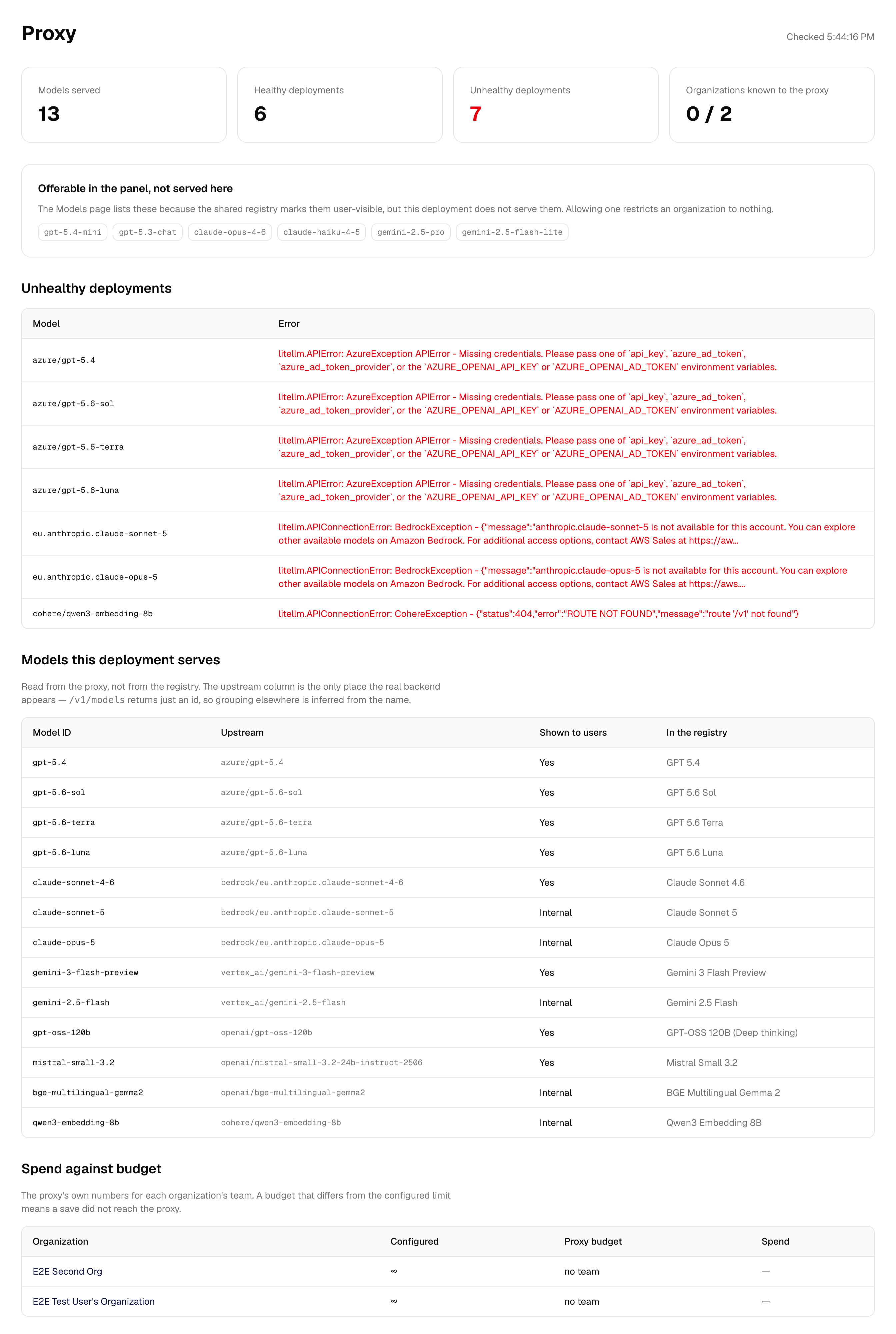
What the LiteLLM proxy actually knows, as opposed to what Ragen believes about it: healthy and unhealthy deployments with the provider's own error text, which models this installation really serves and what backend each resolves to, and per-organization spend against budget with the disagreements marked.
This is the page for "the chat says the model is unavailable". Without the
master key configured it degrades to what /v1/models alone can report, and
says so rather than showing zeros.
Usage
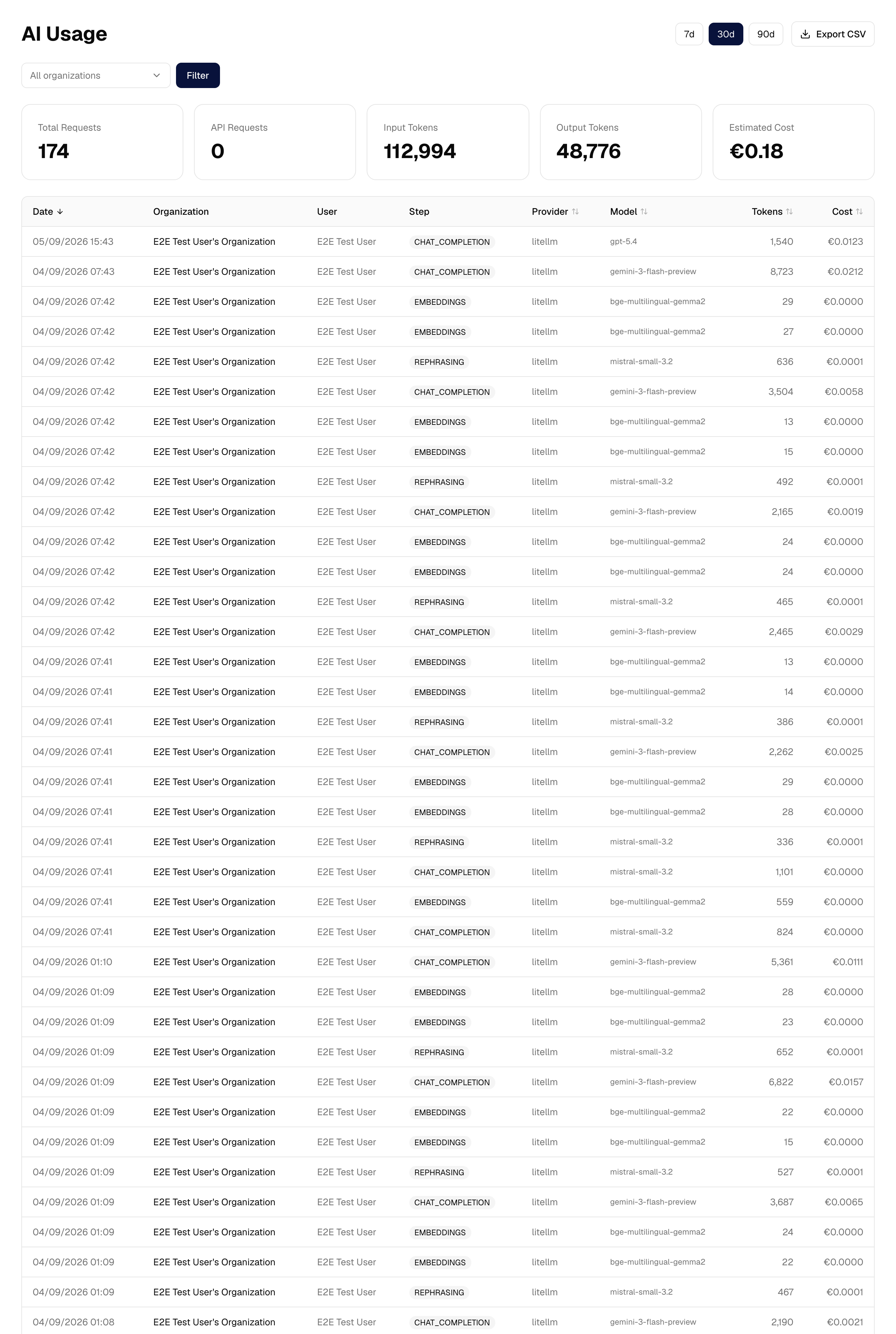
AI Usage is every model call across the installation — organization, user, step, provider, model, tokens and estimated cost — filterable by organization and period.
Disk Usage is storage per organization against each one's ceiling.
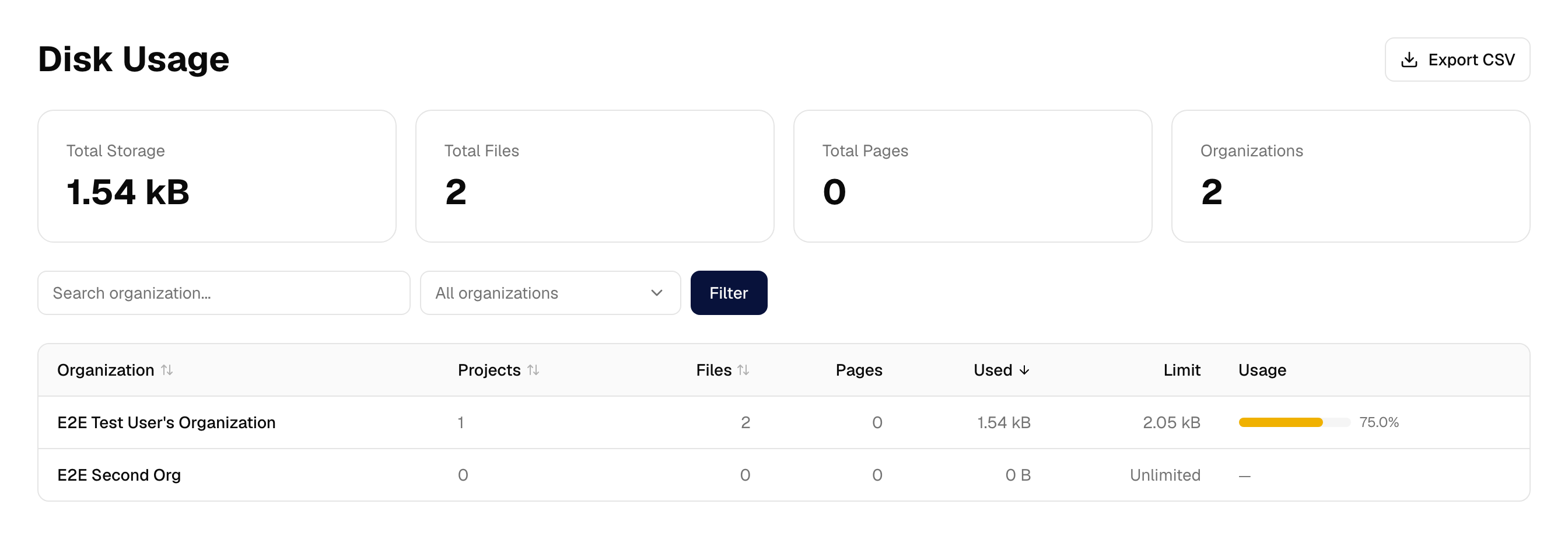
Storage figures come from the same shared arithmetic the customer-facing storage page uses, so the two cannot report different totals for the same files. The AI-usage totals share their field selection and their null-handling; the customer-facing dashboard still builds its own charts on top, which is presentation rather than arithmetic.
Activity log and incidents
Every mutating action in the panel is recorded: who did it, to what, and the before and after values. Sensitive fields are redacted on the way in, so a masked API key or a token never lands in the log.
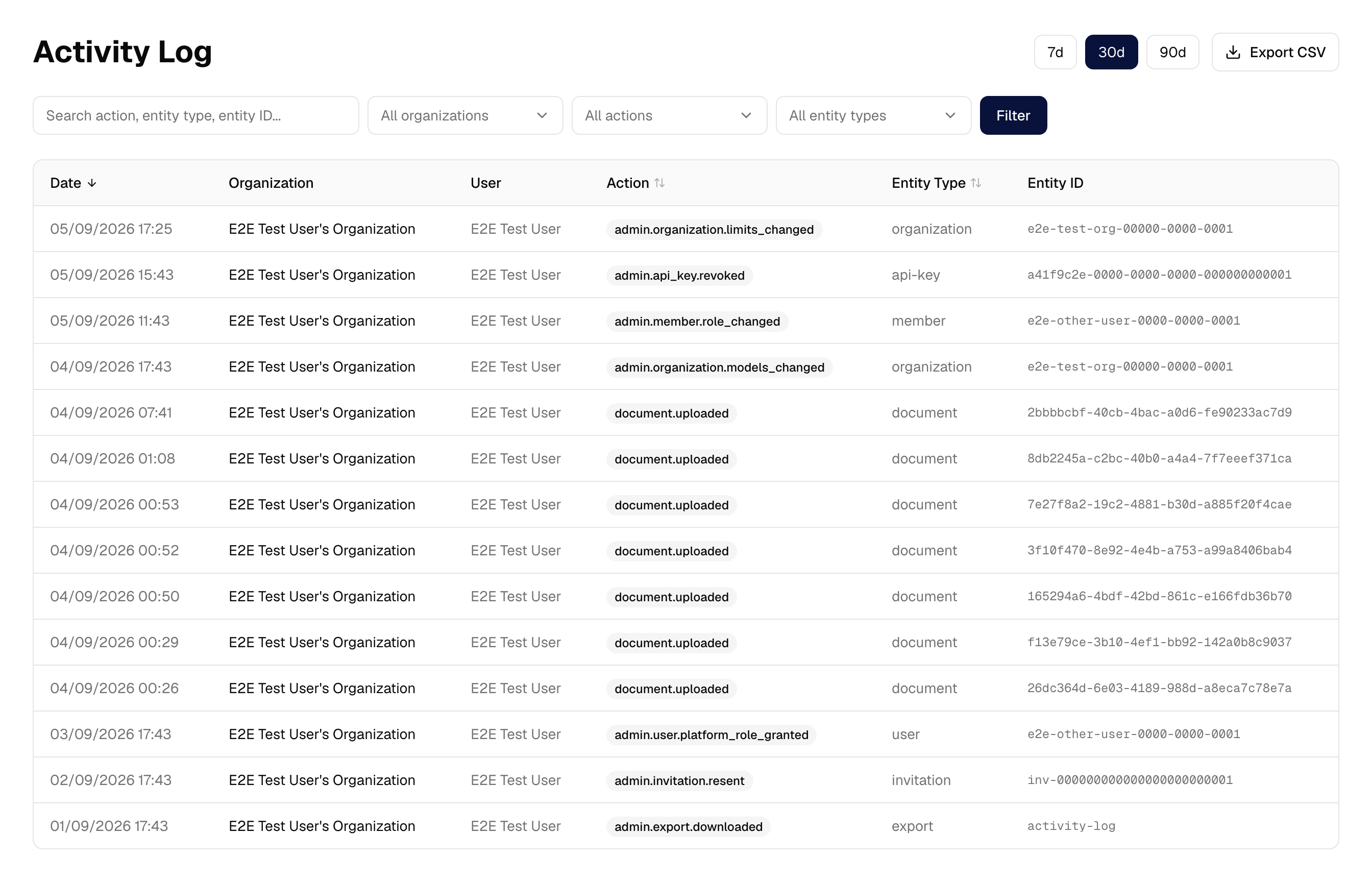
Where an entry goes depends on the action's scope, not on who performed it. An action belonging to one organization is written to that organization's audit log — which is where a customer asking "why did my limit change" will look. An action belonging to the platform, such as granting the platform role, is written as a security event instead.
Incidents is the security-event view: failed sign-ins, brute-force suspicion, revoked credentials, connector authorization failures, rate limits. Events can be resolved, and that is recorded too.
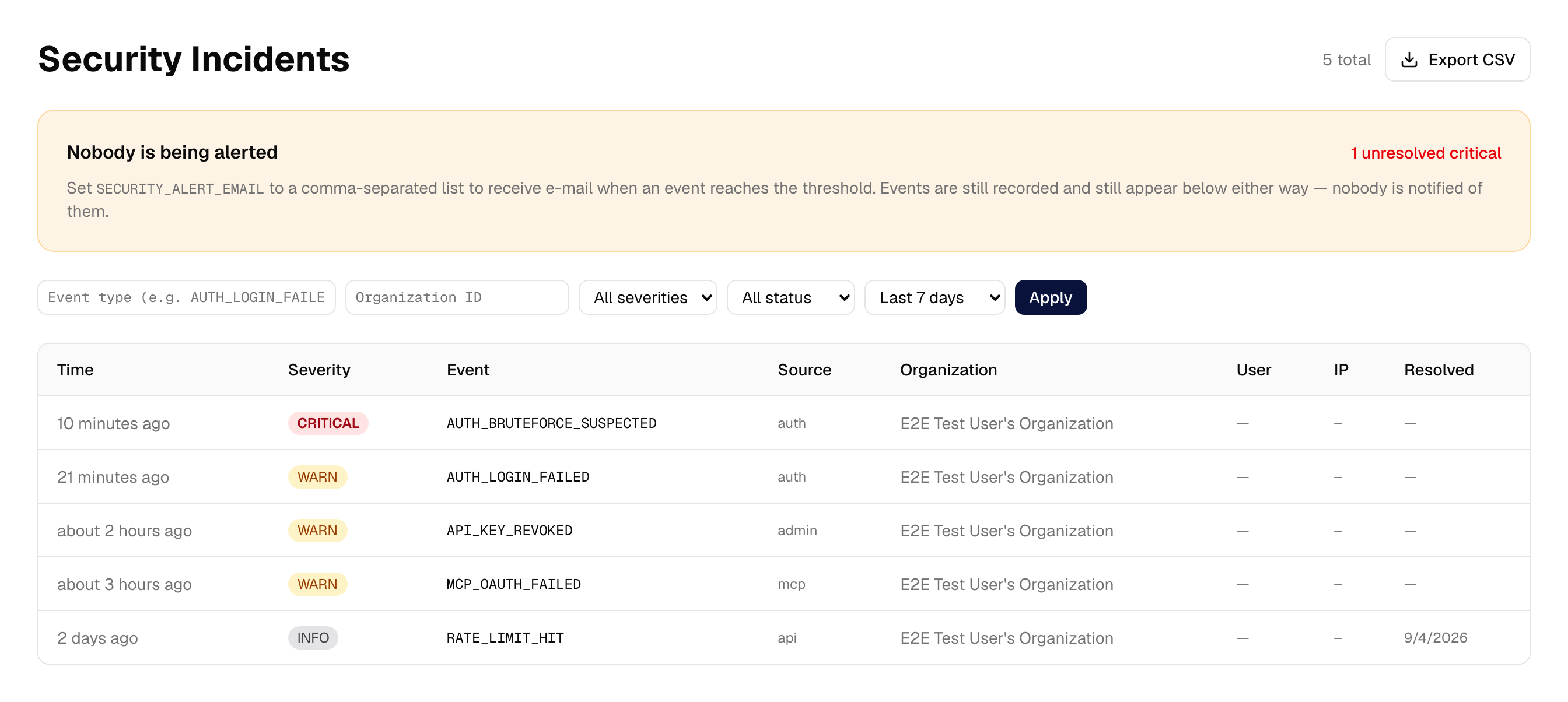
E-mail alerting exists and is off unless configured. SECURITY_ALERT_SEVERITY
sets the threshold, defaulting to critical; alerts are de-duplicated over
fifteen minutes and capped per hour.
Export
Activity log, AI usage, disk usage, API keys, connectors and incidents each export to CSV, honouring the filters currently on screen rather than dumping the whole table.
Cells are neutralised against formula injection, so a value beginning = or
@ cannot execute when the file is opened in a spreadsheet. The API-key
export deliberately omits the masked value: it is a redacted field in the
audit trail, and exporting it would undo that.
Downloading an export is itself recorded — it is how a large amount of customer data leaves the system in one click.
What the panel deliberately cannot do
Read anybody's conversations. The panel has no message viewer and no impersonation control. It was considered and rejected: an operator does not need to read customer messages to run the platform. Thread content is encrypted per organization, and the panel holds no path to decrypt it.
That is enforced, not just unbuilt. The main app loads Better Auth's admin
plugin, which ships an impersonate endpoint at
POST /api/auth/admin/impersonate-user; removing the button would have left
it answering for any account holding the platform role. The plugin has no
"disable" switch, so the platform role is defined without the
user: ["impersonate"] permission its route authorizes on — see
platformAdminAc in apps/web/src/lib/auth-access-control.ts. Banning, role
changes and session revocation are unaffected.
The banner that would warn a user they are being impersonated, and the control that ends such a session, are deliberately kept. They cost nothing and remain the way out of any session created before this was closed.
Create accounts. The panel grants roles and manages membership; the account has to exist first.
Undo a propagation. Applying a default writes customer-visible settings and there is no revert — which is why the preview shows every change before anything is written.
For contributors
The panel is apps/admin, a Next.js application sharing the database and the
Prisma schema with the main app. The scope rule above is enforced by
convention and by tests rather than by structure, so it is worth knowing
before adding a page:
- a read is per-organization in
apps/weband installation-wide inapps/admin; - a write that acts on an organization from outside it belongs only in
apps/admin, and it records an audit entry.
An architecture test asserts the second half: every exported Server Action in the panel must call the auth guard as its first statement, and every mutating one must record an audit entry. An action whose name matches neither the mutating nor the read-only verb list fails the suite rather than being silently exempt.
The reasoning behind the split is recorded in the repository as
docs/adrs/35-two-admin-surfaces-split-by-scope.md. The screenshots on this
page are regenerated by apps/docs/screenshots/capture.mts, against the demo
state in apps/docs/screenshots/demo-data.sql.