

brain feature flag, which is off by default. Only owners and admins of an organization where the flag is on can open it. See Turning Brain on.How it works
Extract
Review
Publish
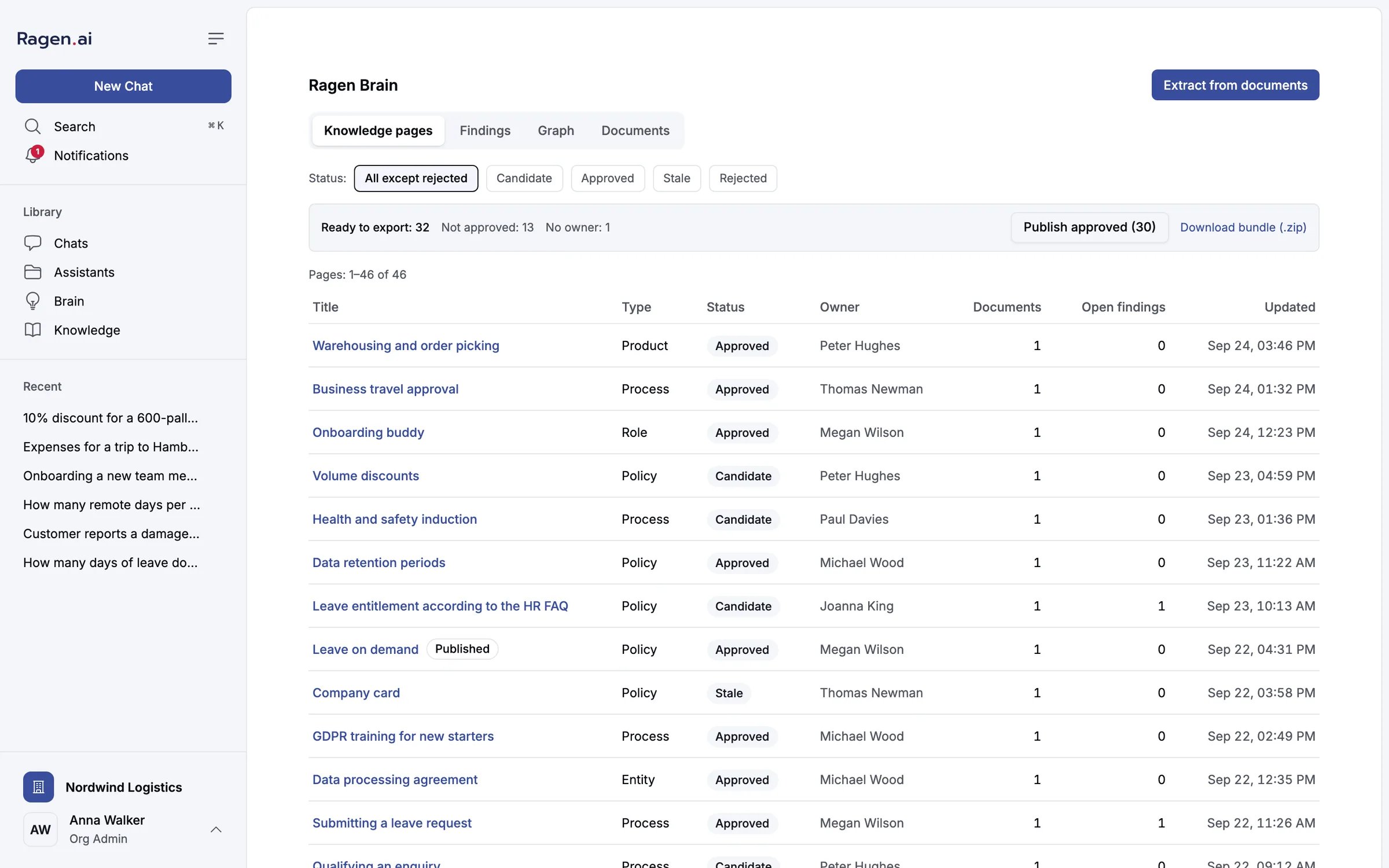
The Knowledge pages tab. The bar above the table counts what is ready to export and offers Publish approved and Download bundle (.zip).
Turning Brain on
The flag is resolved like every other feature flag in Ragen: an organization override wins, then the organization’s plan, then the platform default, then the built-in default (false). A platform administrator changes it in the admin panel under Features:
- For one organization — pick the organization, set Ragen Brain to Force on, and save the overrides.
- For every organization on the installation — set it under Platform defaults. A plan that sets the flag still wins over the platform default.
Extracting knowledge pages
Click Extract from documents. The dialog lists the organization’s parsed documents and pre-selects the ones no page cites yet. Each row shows how many pages already cite it, or Not extracted.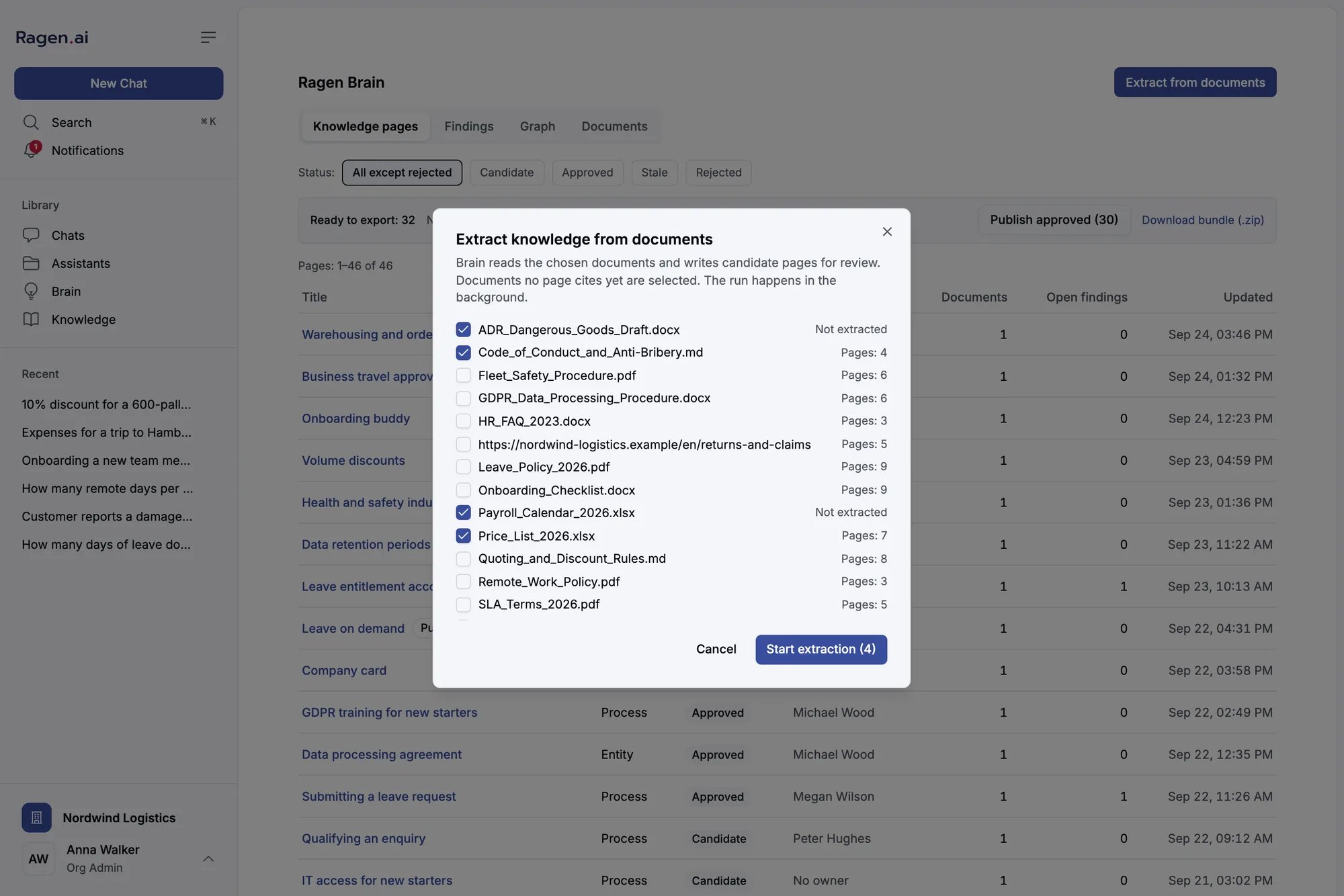
Choosing documents for an extraction run. The count on the button is the number of documents selected.
- A statement is kept only if its quote occurs in the document. The quote is checked against the whole document text, not just the part the model was shown.
- A subject with no verified statement does not become a page. It would be a title with nothing behind it.
- A relation between pages is labelled by its evidence. One whose quote verifies is shown as quoted; one the model says is stated but whose quote does not verify is unconfirmed; one offered without a quote is inferred.
Knowledge pages
Each page has a type, a status and, once someone takes responsibility for it, an owner.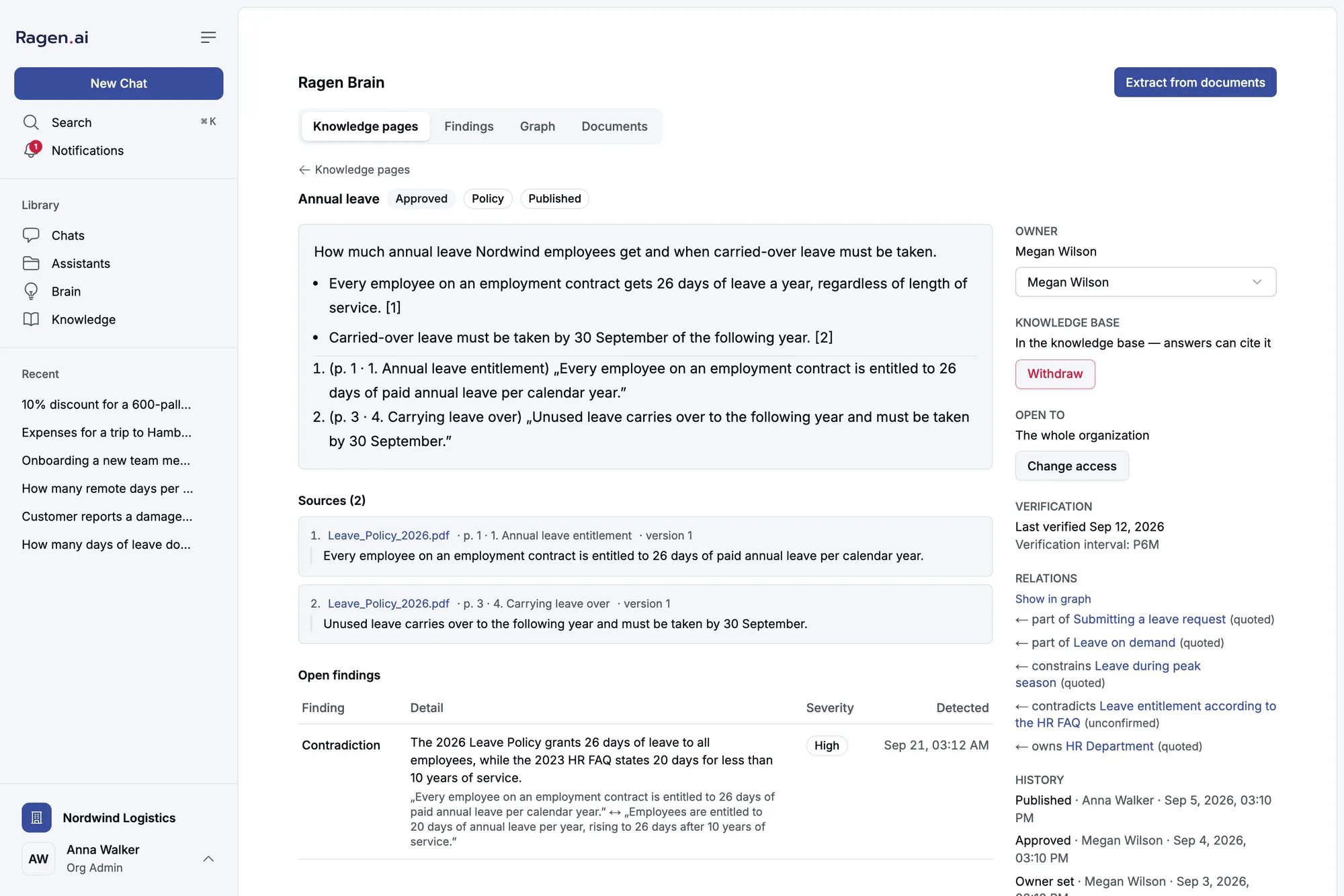
A published policy page. Each [n] points to a quoted source; the open finding below is a contradiction with an older document.
Reviewing a page
Review is done on the page itself, and only owners and admins can do it.- Owner — the person who vouches for the page, not whoever uploaded the source. Choose a member of the organization and save.
- Approve page — available on a candidate that has an owner. The owner must still be a member of the organization.
- Reject page — on a candidate. It cannot be undone from the panel.
- Merge — fold a candidate into another page about the same subject. Its statements and sources move to the target, which keeps its title, takes the narrower access of the two, and goes back to Candidate for review. The merged page is marked rejected and points to the target. The picker suggests pages that look like the same subject first. Neither page may be published.
- Change access — choose the whole organization, teams or people. A change that lets anyone read the page who could not before is a widening: the panel asks you to confirm it, and it is recorded under your name as Access widened. A page open to nobody shows Nobody yet — needs a decision and cannot be published.
Findings
The Findings tab is the list of things a curator should look at, filtered by Open, Resolved or Dismissed.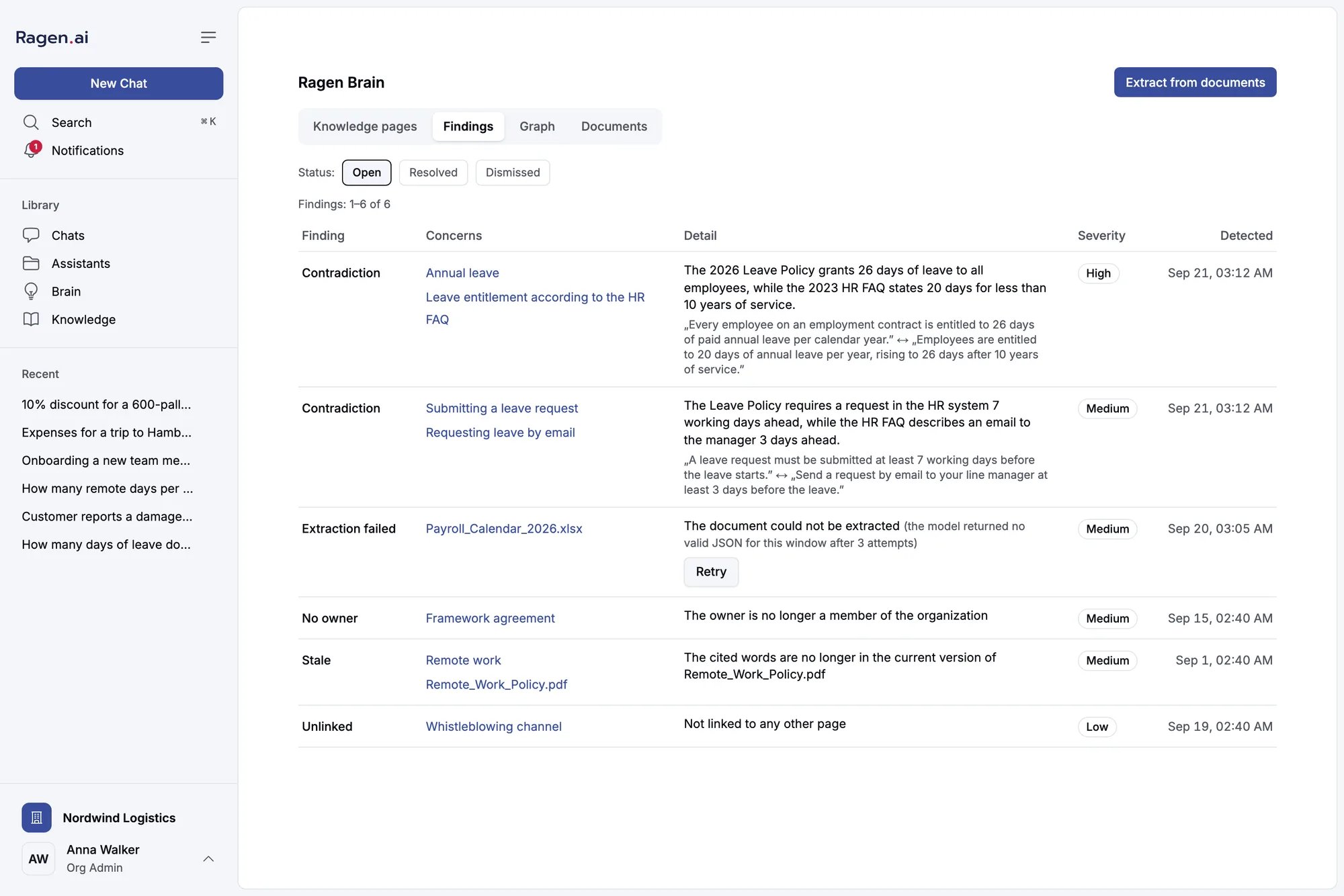
Open findings: two contradictions between documents, a failed extraction with a retry, a page whose owner left, a stale source and an unlinked page.
Graph
The Graph tab draws the pages and the relations between them. Click a page to see its relations and open findings, then Open page or Show neighbourhood to focus on it.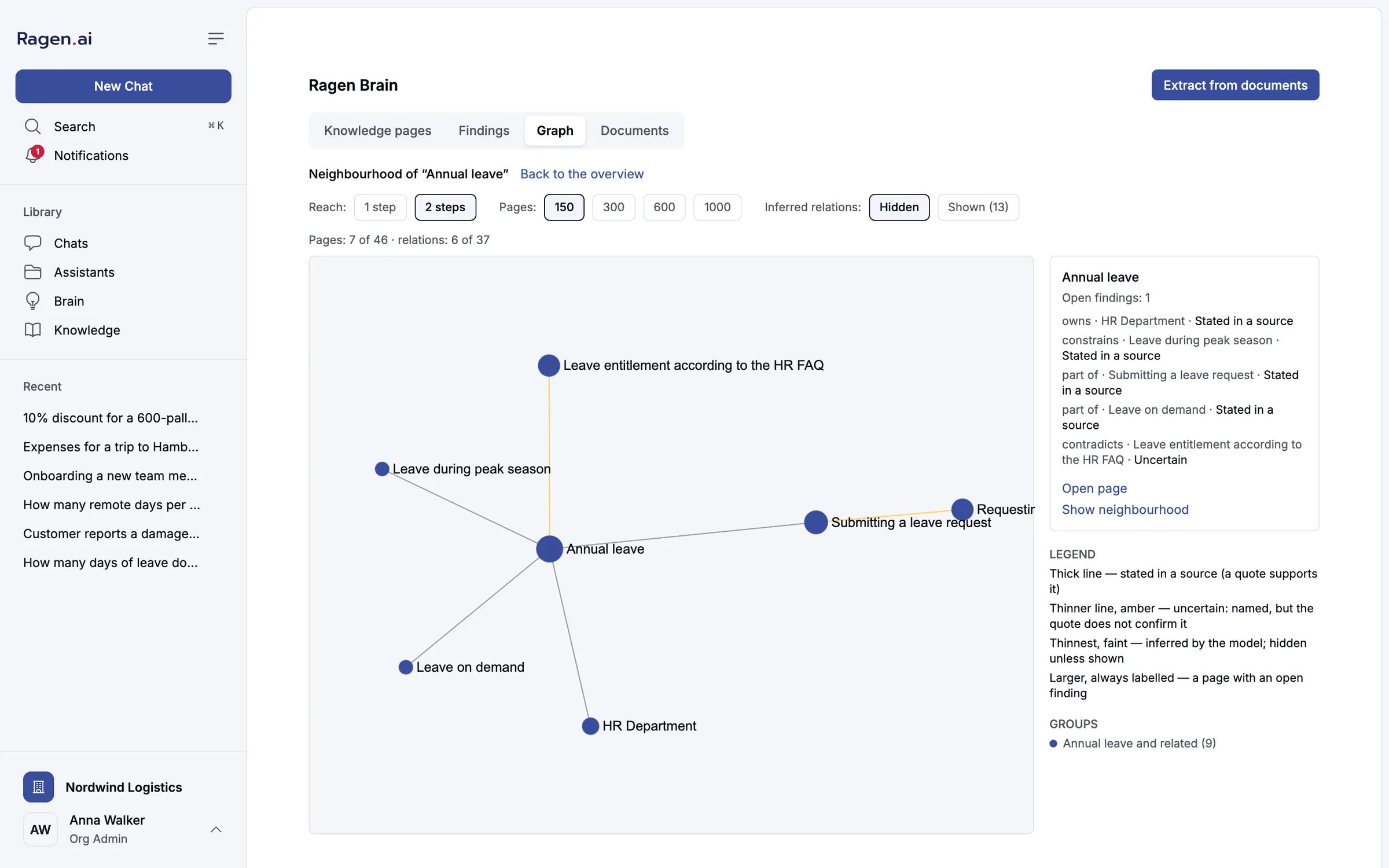
The neighbourhood of one page, two steps out. The amber line is an unconfirmed relation; inferred relations are hidden until you show them.
- Reach — how far out a neighbourhood goes: 1 step or 2 steps.
- Pages — how many pages to draw at most: 150, 300, 600 or 1000. The line under the controls says how many of the total are shown.
- Inferred relations — Hidden by default. Relations the model inferred without a quote are the weakest evidence, so they are never shown unless you ask.
Documents
The Documents tab shows, for each document, how many approved pages and candidates cite it and whether it is in retrieval.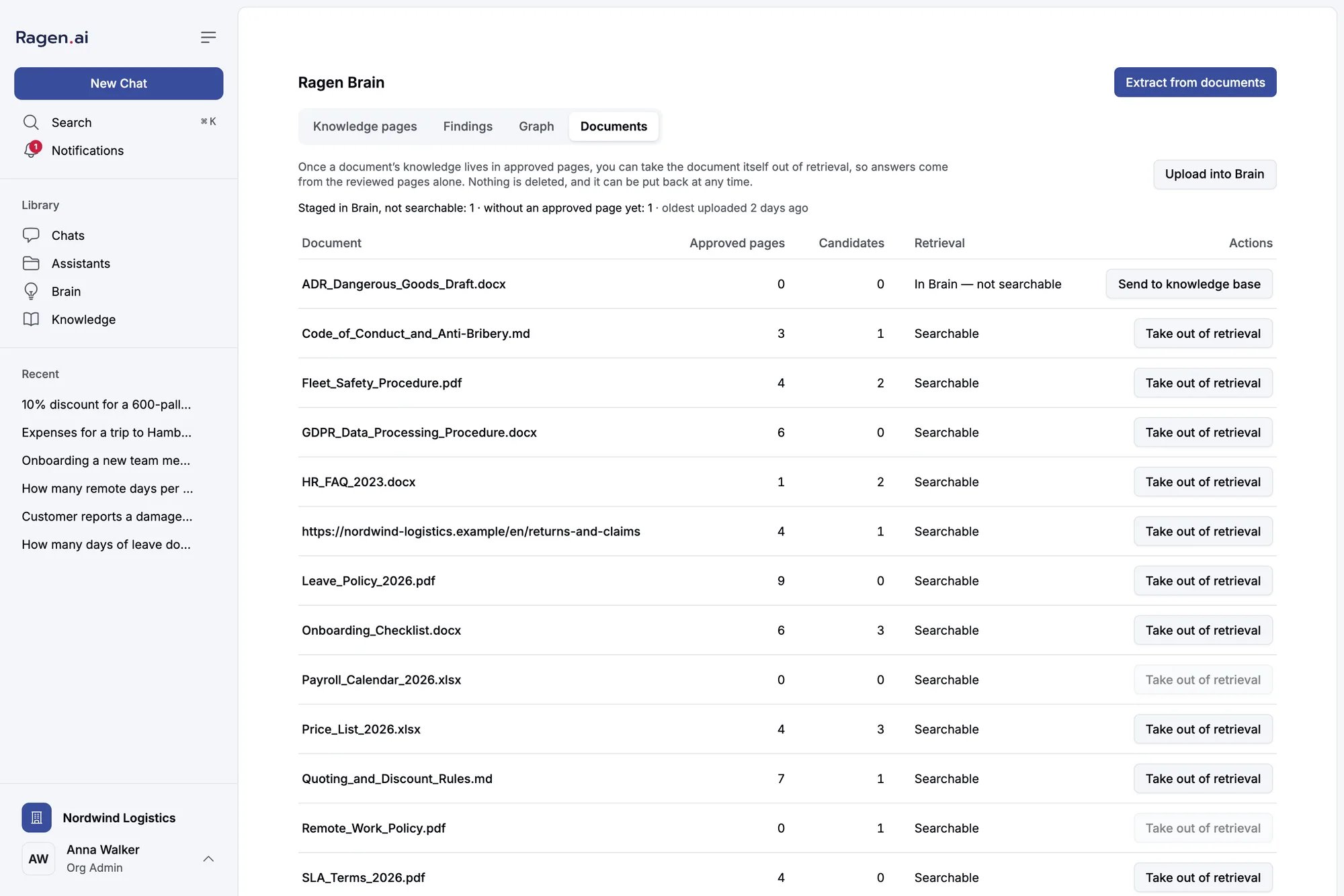
Documents and their retrieval state. The first row was uploaded into Brain alone and is not searchable.
Taking a document out of retrieval
Once a document’s knowledge lives in approved pages, you can Take out of retrieval, so answers draw on the reviewed pages instead of the raw document. The action is available only when at least one approved page cites the document. Nothing is deleted — the document, its versions and every citation stay — and it stays out even when the knowledge base re-processes files later. Put back re-indexes it exactly as an upload would. Brain never does this on its own. It is always a person’s decision, per document.Uploading into Brain alone
Upload into Brain stores and parses files without indexing them. They show as In Brain — not searchable: you can extract pages from them, and while a document stays staged nothing in it can be retrieved or cited — only a published page built from it can reach an answer. This is the way to curate a sensitive corpus before any of it can reach an answer. The protection lasts only as long as the document stays out of retrieval: sending it to the knowledge base (below) makes the whole document searchable. To index a staged document as an ordinary one, use Send to knowledge base. The same action is offered on the Knowledge page and does not depend on thebrain flag, so staged files are never stranded if Brain is switched off.
Publishing to the knowledge base
On an approved page, Publish to knowledge base writes it into the index as its own document, with the page’s access list on every chunk. The panel explains what is missing if the button is not available: the page must be approved, have an owner, and be open to someone. The page’s Knowledge base state tells you where it is:Brain pages in chat answers
A published page is retrieved like any document, under its own access list. When an answer cites one, the source card is labelled Brain page and lists the documents it is based on, with the section of each.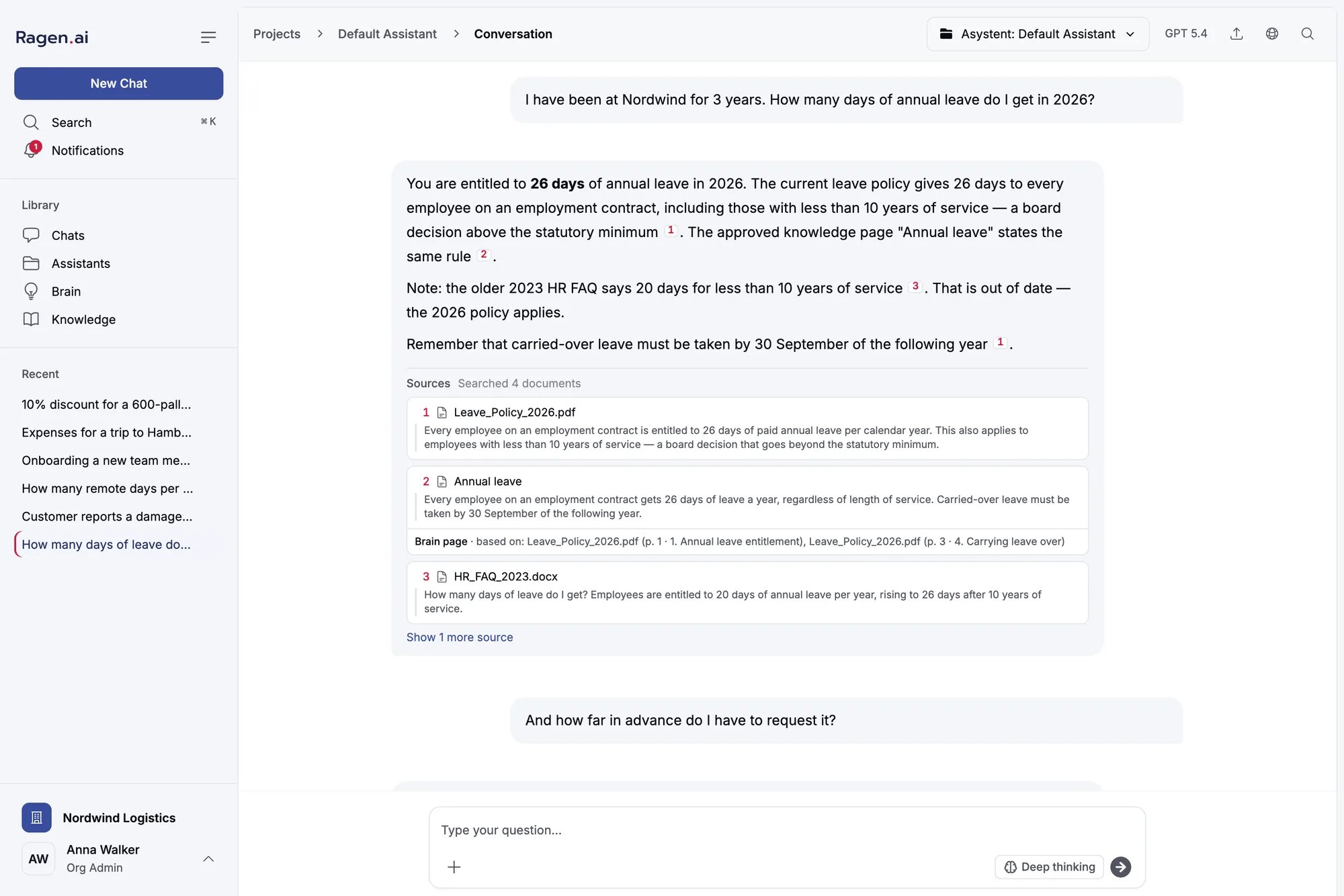
An answer citing the approved page next to the documents. The older document it contradicts is cited too, and the answer says which one applies.
Exporting a bundle
Download bundle (.zip) on the Knowledge pages tab exports the organization’s curated knowledge as files you can read without Ragen:From the terminal
The Ragen CLI has a read-onlyragen brain command that reads the same data through the public API with an API key of an owner or admin: next, doctor, findings, pages, graph, query and export. Approving, merging and publishing stay in the panel, where the reviewer sees the sources and the access they are deciding about.
ragen brain is on main but not yet in a published release of ragen-cli — 0.1.0 predates it. See CLI.Configuration
Brain’s extraction runs on the worker. These variables are read there; all are optional.Current limits
- Contradictions are looked for between pages with the same title. Two documents that name one subject differently — “Leave” and “Annual leave” — are not compared, and the check runs only when extraction writes one of the two pages, so merging them in review does not trigger it either. Review differently titled pages on the same subject yourself; merging them afterwards keeps one page, but does not check its sources against each other.
- Verification is read-only. A page shows its verification interval and last verification when they are set, and the Stale finding fires when the interval lapses, but the panel cannot set an interval or record a verification yet.
- A page’s status does not turn to Stale by itself. Staleness is reported as a Stale finding on the approved page.
- Findings cannot be dismissed from the panel yet. The computed ones close on their own once their cause is fixed.
- Only a candidate can be approved or rejected. Retiring an approved page means withdrawing it from the knowledge base.